
Updated Oct 9, 2026: new timing data below
I published six articles on two brand-new sites and watched Search Console to see how fast Google showed up. Here’s what happened, what probably caused it, and what this test can’t tell you.
How long does it take Google to index a new page on a brand-new site?
Ask around and you’ll hear everything from “a few hours” to “a few months,” often from the same person. So I timed it.
For Experiment 001, I built two brand-new twin test sites on WordPress, launched the same day. (Here’s how I set up the hosting for the twins, if you enjoy that sort of thing.) Before the real experiment starts, they needed content. That gave me a free side test: how fast would Google crawl and index six articles, three per site, on domains it had never seen before?
Short answer: fast. Faster than I expected. But there’s a catch, and I’ll get to it before you run off and tell your clients.
The setup: six articles in ten seconds
I launched two new WordPress sites, published three articles on each, and asked Google to index them right away.
- Two brand-new domains, both on WordPress, launched the same day.
- Search Console properties verified for both on Oct 1, 2026.
- All six articles published Oct 2, 2026, between 8:42:49 and 8:42:59 AM ET. That’s six articles in 10 seconds.
- Right after publishing, I submitted each site’s sitemap in Search Console and clicked “Request indexing” on all six article URLs.
Then I waited, which I’m bad at, and pulled the data from Search Console’s URL Inspection, Sitemaps, and Pages reports on Oct 8.
The results: Google showed up before I finished refreshing
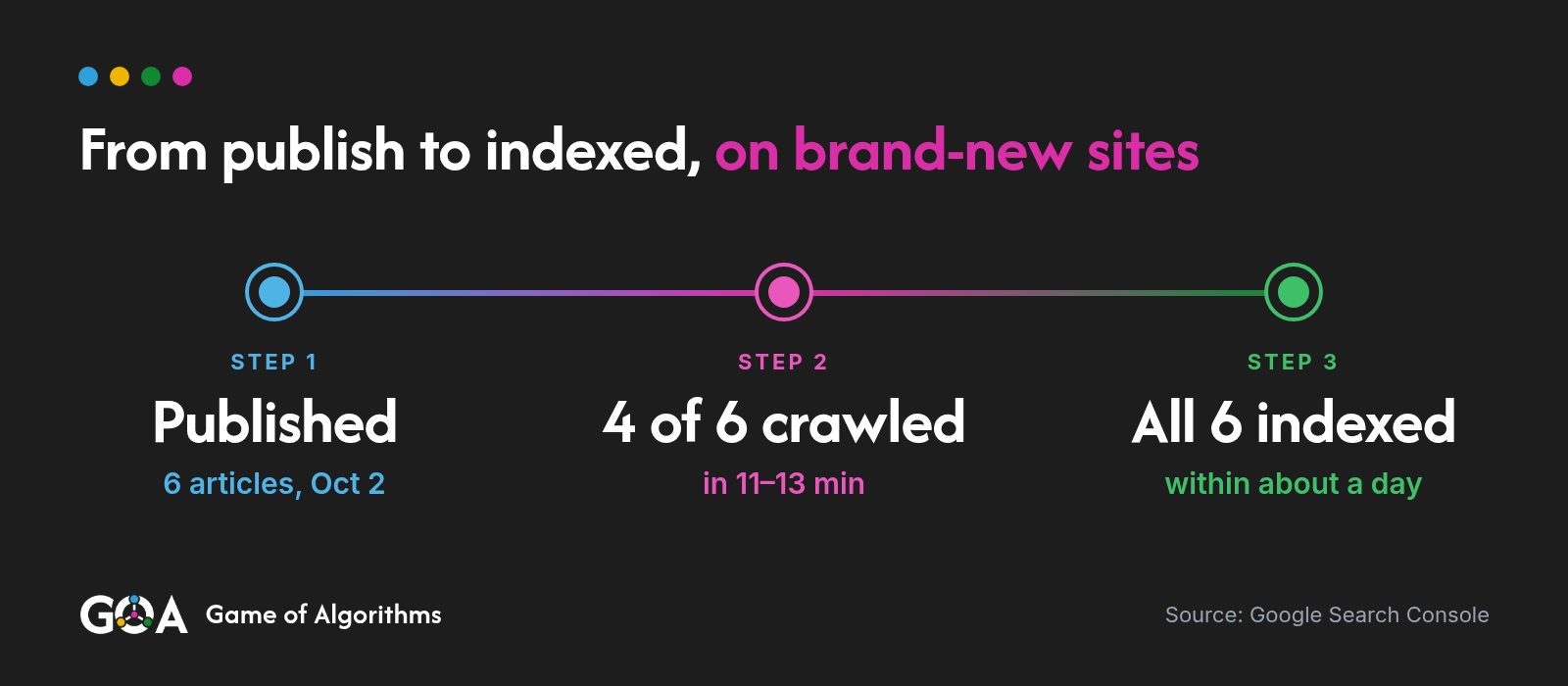
Four of the six articles were crawled 11 to 13 minutes after publishing, and all six were indexed within about a day.
- 6articles published in 10 seconds
- 4 of 6crawled in 11–13 min
- 6 of 6indexed within about a day
All times are Eastern. “Minutes” is time from publishing to the last crawl Search Console shows, only where that crawl happened the same day.
| Site | Article | Published | Last crawl | Minutes to last crawl | Status |
|---|---|---|---|---|---|
| A | 1 | Oct 2, 8:42 AM | Oct 2, 8:55:04 AM | ~12 | Indexed |
| A | 2 | Oct 2, 8:42 AM | Oct 3, 8:05:26 AM | n/a (recrawled) | Indexed |
| A | 3 | Oct 2, 8:42 AM | Oct 3, 4:19:21 AM | n/a (recrawled) | Indexed |
| B | 1 | Oct 2, 8:42 AM | Oct 2, 8:53:40 AM | ~11 | Indexed |
| B | 2 | Oct 2, 8:42 AM | Oct 2, 8:55:41 AM | ~13 | Indexed |
| B | 3 | Oct 2, 8:42 AM | Oct 2, 8:55:41 AM | ~13 | Indexed |
The other two show a last crawl on Oct 3. That doesn’t mean Google took a day to find them. URL Inspection only shows the most recent crawl, not the first one. Those two got recrawled, so their first crawl time is gone. They may have been just as fast. I can’t prove it either way, and I’m not going to pretend I can.
All six now say “URL is on Google” and “Page is indexed.” All six were crawled as Googlebot smartphone, the page fetch was successful, and Google picked each page as its own canonical. No surprises, which is the only kind of surprise you want from Google.
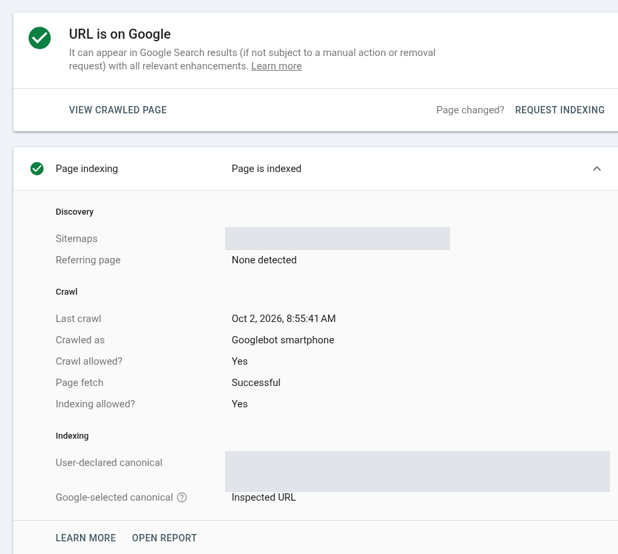
The Pages report, last updated Oct 3, showed every article indexed. So all six were indexed within about a day of publishing. Search Console doesn’t give an exact indexed timestamp, so “within about a day” is as precise as I can honestly get.
How Google found them, according to the paperwork
Search Console listed the sitemap as a discovery source for every article.
On Site A, two articles also listed an internal link from another article as a referring page, and one listed the RSS feed. Site B showed no referring page at all.
Same setup, slightly different paperwork. I’m not reading anything into that with six pages. Tea leaves would be a bigger sample.
The catch: I pushed two buttons at once
I submitted sitemaps and clicked Request indexing on every URL at the same time, so this test can’t say which one did the work.
My honest guess is that the 11 to 13 minute crawls came from the manual indexing requests. That’s what the button is for. I would not take this post as proof that a sitemap alone gets you crawled in minutes. It might, it might not. This test wasn’t designed to answer that.
A proper comparison would split new pages into groups: sitemap only, Request indexing only, and internal links only, then time each. That’s a future quick test.
Some context while we’re here. Google retired its sitemap “ping” endpoint in 2023, so you can’t nudge Google that way anymore. Google also doesn’t support IndexNow. On Google, your levers are basically sitemaps, links, and the Request indexing button in Search Console.
What actually went wrong, starring me
The problems in this test were setup issues on my end, not slow crawling.
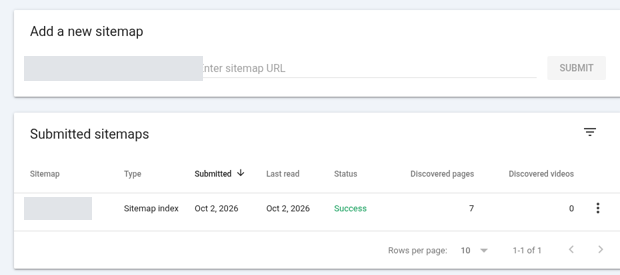
My sitemaps failed at first. Both showed “Couldn’t fetch” right after I submitted them, which is common for new properties. I added the Sitemap line to robots.txt and resubmitted the same day, and both later showed Success with 7 discovered pages each. The change coincided with the fix. I can’t say it caused it.
WordPress leftovers. Each site has a few 404s in the not-indexed list. They’re from the default “Hello world” post I deleted, plus its archive and author pages. Google found them through WordPress’s old built-in sitemap before my SEO plugin’s sitemap replaced it. Google remembers things you’d rather it forgot.
Thin default pages. A couple of pages, like the WordPress sample page, landed in “Crawled – currently not indexed.” Fair. They have nothing worth indexing. I’d have made the same call.
None of this hurt the six articles. But on a real client launch, this is the stuff that shows up in a report and makes someone nervous.
What I can’t tell you, which is a longer list than I’d like
This test has six clear limits.
- Which method caused the fast crawl. Sitemaps and Request indexing were used together.
- The first crawl time for two of the six articles. Search Console shows last crawl, not first.
- The exact moment each page was indexed. Search Console doesn’t show it. “Within about a day” is the best I have.
- Whether this holds at any scale. Six articles, two sites, one day. Treat it as an anecdote with a table.
- Whether older or bigger sites behave the same. These were brand-new, clean domains with almost nothing on them.
- What the server saw. I didn’t check server logs, so I’m only working from what Search Console reports.
The takeaway
On a clean new site, requesting indexing by hand in Search Console, alongside a submitted sitemap, got four of six pages crawled in minutes and all six indexed within a day.
That’s a decent baseline to know. The headaches weren’t Google being slow. They were a sitemap that wouldn’t fetch at first and some default WordPress pages I didn’t clean up early enough. If you’re launching a new site, check your robots.txt, sitemap, and leftover default pages before you start refreshing Search Console like it owes you money.
The two test sites now head into the quiet baseline for Experiment 001, the twin-site test of whether engagement from search moves rankings. If you want the results when it finishes, whichever way it goes, follow along on Game of Algorithms.
Update, Oct 9, 2026: I timed it again with this post and its companion post on this site. I requested indexing for each one in Search Console on Oct 8, at 12:14:57 PM and 12:16:42 PM ET. Google crawled both at 12:18 PM ET, within about 2 to 4 minutes of the requests, and both were indexed by the next day. Same caveats as before: I used Request indexing alongside a sitemap, so this doesn’t compare methods. This site also isn’t brand-new like the twin test sites, and Search Console only shows the most recent crawl.
FAQ
Does Google support IndexNow?
No. Google doesn’t support IndexNow, and it retired its sitemap “ping” endpoint in 2023. On Google, your levers are sitemaps, links, and the Request indexing button in Search Console.
How do I get Google to index a new page faster?
Use URL Inspection in Search Console and click Request indexing, keep a working sitemap submitted in Search Console, and link to the new page from your other pages. In my test, four of six pages were crawled in 11 to 13 minutes, most likely thanks to Request indexing, but I used it together with sitemaps, so this test didn’t compare methods.
Get the next result first
One short email when a test finishes, with the real numbers, even when the answer is “nothing happened.”